An's Blog
收藏、分享 …
Toggle navigation
Home
Cesium
SuperMap
ArcGIS
MapboxGL
CentOS
GeoServer
Favorites
Archives
Tags
Huggingface模型无法git clone解决方案
2025-02-11 09:48:41
1
0
0
admin
**解决方案:**选择python依赖包,用代码程序解决,使用pycrawlers这个python包,使用这个包可以轻松实现批量下载,以及进度显示。 **第1步:使用conda创建虚拟环境,执行以下命令:** conda activate download-model **第2步:设置编码编码方式,否则提示安装不成功,错误如下图所示:** set PYTHONUTF8=1 pip install pycrawlers 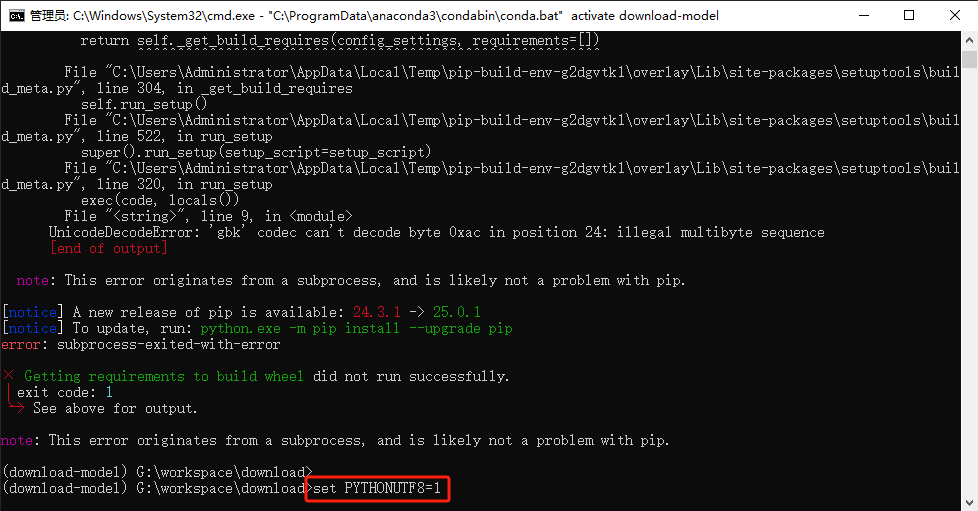 **第3步:创建huggingface_model_download.py文件,写入以下代码** # 此类用于下载Huggingface模型文件 from pycrawlers import huggingface # 实例化类 hg = huggingface() # 1.批量下载 #urls = ['https://huggingface.co/shibing624/text2vec-base-chinese/tree/main', # 'https://huggingface.co/ziqingyang/chinese-llama-2-7b/tree/main'] # 默认保存位置在当前脚本所在文件夹 ./ #hg.get_batch_data(urls) # 2.单个下载 #url = 'https://huggingface.co/shibing624/text2vec-base-chinese/tree/main' url = 'https://huggingface.co/sentence-transformers/all-MiniLM-L6-v2/tree/main' # 默认保存位置在当前脚本所在文件夹 ./ hg.get_data(url) # 自定义下载位置 # 多个不同位置 #paths = ['/home/model-gpt/chinese-llama-2-13b','/home/model-gpt/chinese-llama-2-7b'] #hg.get_batch_data(urls, paths) # 单一位置 #path = '/home/model-gpt' #hg.get_data(url, path)
Pre:
大模型入门到精通(RAG知识库)——数据清洗
Next:
Conda 常用指令
0
likes
1
Weibo
Wechat
Tencent Weibo
QQ Zone
RenRen
Table of content

 An's Blog
 admin
admin